A Custom CRM Built Around How Your Business Actually Works
By Alex B. · Updated
Your stages, your fields, your staff rules and your customer messages, built by a Richmond Hill owner who runs a custom CRM in a working business every day. One fixed fee covers the build and your first year of hosting. You pay no monthly fee to us and no per-user fees, and you keep the full code and your data.
Fixed quote after a free call·Locally owned in Richmond Hill
Locally owned · Richmond Hill, GTABuilt around how you already workOne fee · No monthly subscription to usFirst year of hosting includedFull code handed over · Your data · Your hostingFixed quote after a free callLocally owned · Richmond Hill, GTABuilt around how you already workOne fee · No monthly subscription to usFirst year of hosting includedFull code handed over · Your data · Your hostingFixed quote after a free call
Sales pipeline
Real CRM screens · fictional demo company and data
// the short answer
What is a custom CRM?
A custom CRM is customer-management software built around one business's own process, so leads, clients, quotes, scheduling, texts and invoices follow the way your team already works.
Off-the-shelf CRMs sell one product to thousands of businesses. You get their stages, their fields and their idea of who should see what, and most paid plans charge each month for every person who logs in. A custom CRM starts from your side. We go through how you take an enquiry, quote it, book it, do the job and get paid, then build the screens and rules to match.
Each business gets its own build on its own hosting account. You keep the full code and your data instead of renting a login to a shared product, so the customizing can go as deep as your process needs.
// the usual problem
Why does an off-the-shelf CRM never quite fit?
Most owners we talk to pay for software that almost fits, then spend years working around the gap. Three complaints come up again and again.
You bend your process to its fields
Your site visit becomes their "deal stage 2". The gate code lives in a notes box. Your staff learn the software's words instead of yours.
The bill grows with every hire
Per-user pricing means each new technician or office person adds to the monthly cost, for as long as you use the tool.
Your data lives on their terms
Your client list sits on the vendor's servers under their plan limits. Leaving means an export, a migration and learning a new tool from scratch.
// built around you
What can be customized in your CRM?
Every part that touches your working day. Each build starts from pieces already proven in a working CRM, then we shape each piece to your trade, your staff and your paperwork. You describe how you work, and we change the software to match.
Pipeline stages
Your stages in your words: enquiry, site visit, quote out, booked, done. You decide when a job moves on its own and how many quiet days pass before a quote gets a follow-up or closes as lost.
Client and job fields
Gate codes, equipment installed, permit numbers, warranty dates, a dog in the yard. The details your crew needs get their own place on the record.
Roles and who sees what
Owner, office, booker, technician, subcontractor. You decide what each role can open, and the server enforces it, so a hidden page stays hidden.
Automatic texts and emails
You pick which messages go out, on what trigger, how long after and in whose name: booking confirmations, reminders, "on my way", invoices and review requests. Quiet hours are yours to set.
Estimates and invoices
Your layout, wording, price list and HST. Offer two to four options, let customers approve online with a typed name, and set your own deposit terms.
Booking rules
Job types and lengths, who can do which job, working hours and drive time between jobs. Online booking requests can wait for your approval.
Calendar and dispatch
One calendar or several. Drag a job to a new time and the CRM asks whether to tell the customer. Clash and time-off warnings show before you book.
Technician phone app
A job list, status buttons and an end-of-job report shaped to your paperwork: work done, payment method, photos, notes and a customer signature.
Crew pay rules
Paid by the job, by the hour or a split? The CRM works out pay by your rules, and a dated rate change leaves past pay untouched.
More than one brand
Run two company names in one system. Each brand gets its own phone number, email, wording and documents.
Reports you actually read
Sales, money still owed, enquiries by source, how fast you answer, quotes won and lost. Export any list to a spreadsheet file.
Your words on screen
Call them jobs, visits or tickets. You choose what sits on the home screen each morning and what each role sees first.
Can connect to
Google Calendar
Google Maps addresses + drive times
Gmail and company mailboxes
Twilio texting + calls
Square card payments
Interac e-Transfer notices
Your website forms
Phone push notifications
Optional AI writing help
Need another tool connected? Name it on the call and we'll quote it.
// rules from a working CRM
Your business, your rules
Each rule below runs today in the CRM behind these screenshots, adapted here to other trades. Bring your own rules to the call and we write them into your build.
Rule 01
Only managers see margins
Staff see their own jobs and their own pay. Rates, margins and everyone else's pay stay with the owner.
e.g. a plumber with two apprentices
Rule 02
Texts go quiet after 8:30 pm
Customer texts wait until morning. You pick the exceptions, like an "on my way" text that still goes out.
e.g. a crew that runs evening jobs
Rule 03
Review requests only when earned
The request goes out the day after a paid job. It skips return visits, customers who already reviewed you, and anyone who replied STOP.
e.g. a house-cleaning company
Rule 04
Two brands, one system
Every text, email, estimate and link goes out under the right company name. Customers of one brand never see the other.
e.g. a landscaper with a snow-removal side
Rule 05
Warranty dates per product
One year on labour, two years on a specific part. A callback inside the warranty shows as free before anyone quotes it.
e.g. an HVAC installer
Rule 06
Quiet quotes get chased
An unanswered quote puts a follow-up on your list on day two and closes as lost on day ten. You pick the days.
e.g. a renovation contractor
Rule 07
Only the right tech hears about a change
A technician gets a text when one of their own jobs in the next 48 hours is added, moved or cancelled. A short hold keeps a quick fix from going out at all.
e.g. any team with two or more techs
Rule 08
The checklist before the knock
Gate codes, pets, parking and permit numbers sit on the technician's screen before they reach the door.
e.g. a pest-control company
If you can describe the rule, we can usually build it. When we can't, you'll hear that on the call, before you spend anything.
Got a rule your current software can't handle? Bring it to the call.
What does a CRM built for a real service business look like?
These screens come from the CRM our founder built and runs every day in a separate service business, where an owner, a booker and technicians work in it. For this page we set it up as a fictional plumbing and heating company with two divisions, the same kind of reshaping every build involves. Every name, phone number and address you see is fictional demo data.
Today · owner view
TodayThe owner's morning screen: tomorrow's jobs with access notes, enquiries waiting for a reply with a timer on each, and follow-ups due. You choose what sits here.
Client record
Client recordEvery call, text, estimate and invoice for one customer in one place, with a sales card and the service categories this business sells, from drains to heat pumps.
Calendar · week
CalendarA week of plumbing and heating jobs across two divisions and three technicians, colour-coded. Drag a job to a new time and the CRM asks whether to tell the customer.
Leads · inbox
Lead inboxWebsite enquiries land here with how long each one has waited. Call, text, email or start an estimate in one tap.
Messages
TextingTwo-way texts from the business number. Each division texts from its own number, on timing rules the owner set.
Estimate
EstimateEstimates built from the price list, with HST and an approve-online link. The logo, layout, wording and terms are the business’s own.
Money · owner only
MoneyIncome by division, crew balances, charged versus collected, and margin trends. Only the owner can open this page.
Clients
Client listClients for both divisions, searchable and filterable, with an export button for a spreadsheet copy.
What your technicians see on their phones
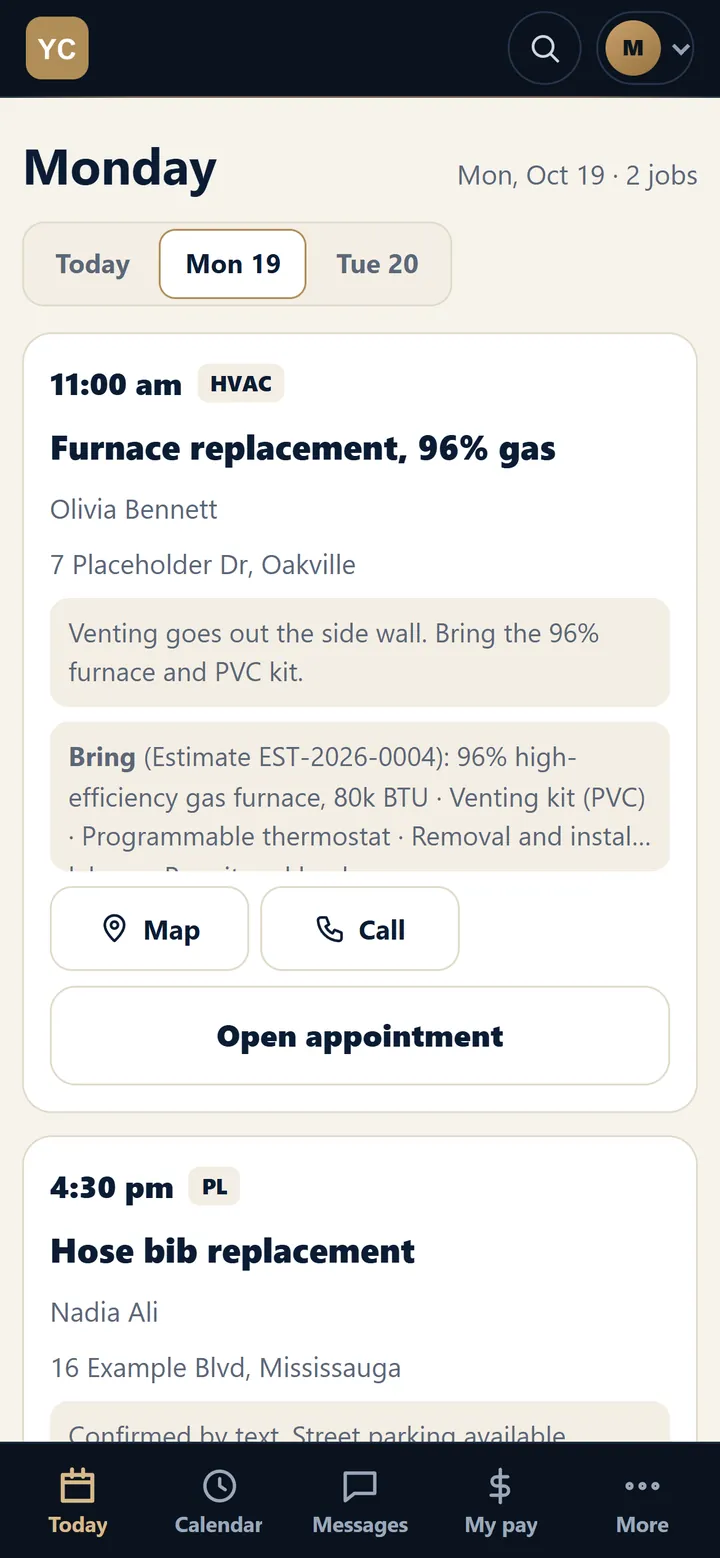
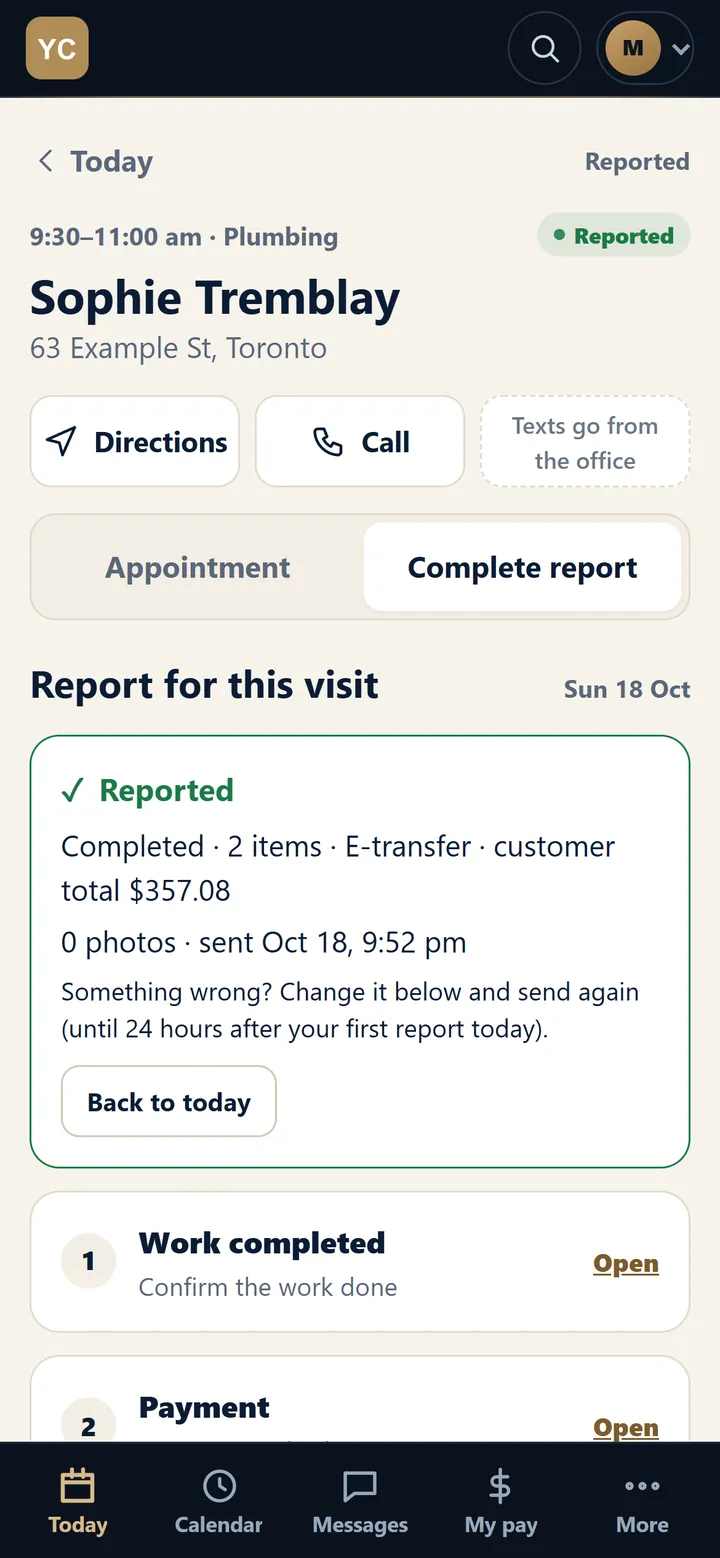
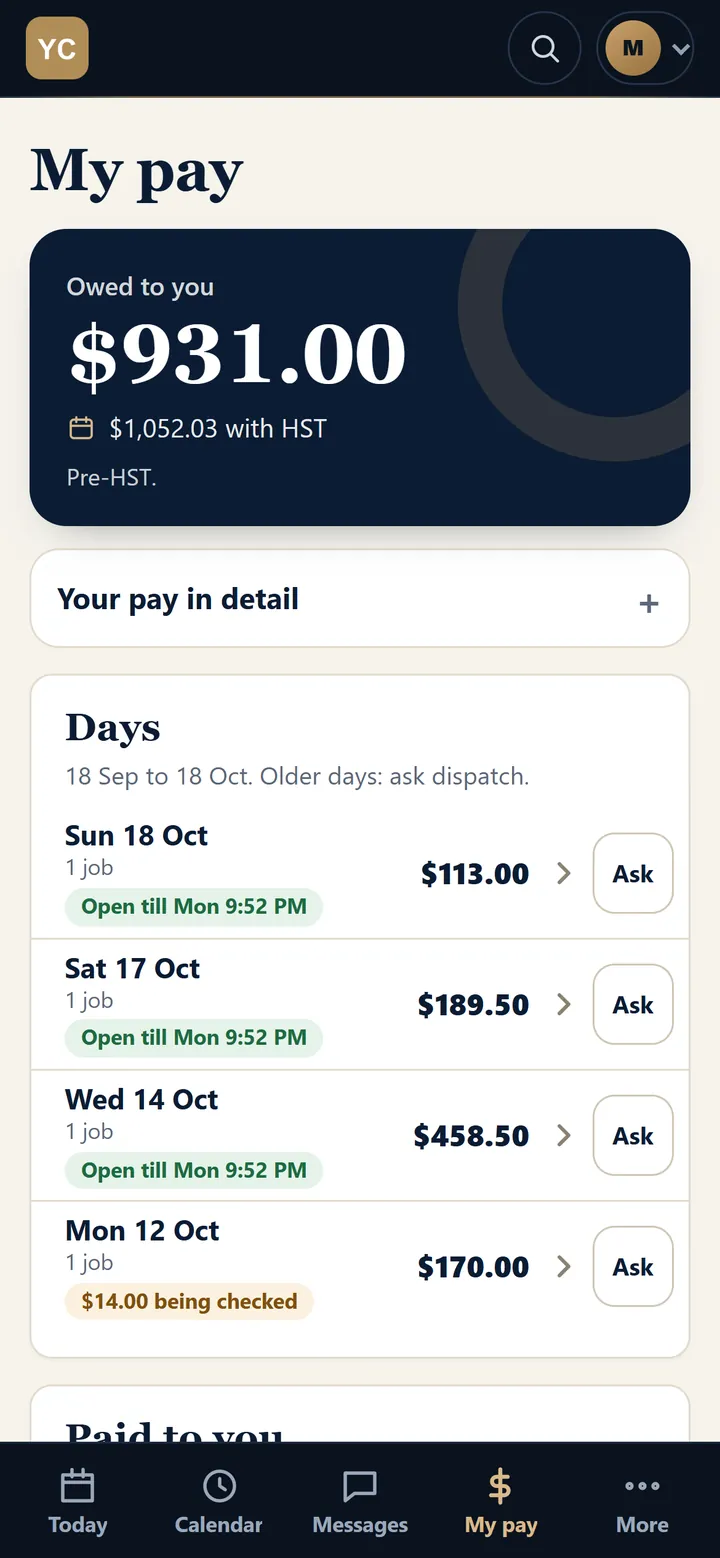
The crew app installs from a web page. Each technician sees their own day, files the job report on site and checks their own pay.
The day's jobs with access notes, what to bring, a map and a call button.
The end-of-job report. With no signal, it waits on the phone and sends later.
Each technician sees their own pay and nothing else.
Our founder built this CRM to replace an off-the-shelf one that never matched how the business runs. Today it handles enquiries, quotes, booking, the crew's phones, customer texts and pay. That business and MoreJobsLocal share one founder, so treat it as our own system in daily use rather than a client case study.
The operator behind MoreJobsLocal is also the person who would build yours. You talk to the builder from the first call to go-live, with no hand-off to a junior team.
// how a build works
How does the build work, from free call to launch?
Six steps. You stay involved where your knowledge matters, and we handle the rest. We expect most small-business builds to take a few weeks, depending on how many parts you want and how fast feedback comes back.
Free callYou walk us through how a job moves today, from the first phone call to getting paid. We tell you plainly whether a custom CRM makes sense for you.
Workflow map and fixed quoteWe write down your stages, roles, messages and screens. You correct the map, then approve one fixed price with the scope in writing.
First working versionEarly in the build you get a live version with your stages and fields, on test data. One or two of your staff click through it.
Feedback roundsWe adjust wording, rules and layout in short rounds. Specific feedback speeds this step up more than anything else.
Data import and trainingWe import your clients from your spreadsheet or old CRM and queue possible duplicates for you to check. Your office and crew get a walk-through, and technicians install the phone app.
Go-live and handoverYou switch over on an agreed day with us on hand. The code, the data and the hosting account are yours.
// pay once
What do you pay, and what do you never pay?
You pay MoreJobsLocal once. One fixed fee covers your custom CRM build and your first year of hosting. After that you pay your web host directly, and MoreJobsLocal never charges a subscription or a per-user fee.
We don't post a price, because no two builds have the same parts. You get a fixed quote after the free call, before any work starts.
Paid once
To us, one time
Your custom build, shaped to your business
Setup, client import and a team walk-through
Your first year of hosting, set up by us
Never
Never to us
A monthly subscription
Per-user or per-seat fees
Licence renewals
A fee to export your data or leave
Paid to providers
Direct, at their prices
Web hosting from year two, billed by your host
Your domain name renewal
Texting and calling, if you use them (e.g. Twilio)
Card fees, if you take cards (e.g. Square)
Google Maps usage beyond the free allowance
AI usage, if you turn AI features on
Want a change or a new feature later? You get a one-time quote first, and you decide whether to go ahead.
// side by side
Custom CRM vs off-the-shelf: how do they compare?
Off-the-shelf suits a standard sales process and same-day setup. A custom build suits a business with its own quote rules, roles, brands or paperwork.
Compared
Typical subscription CRM
Custom CRM from MoreJobsLocal
Fit
One product for every business. You adapt to its fields and steps.
Mapped to your jobs, roles and rules before we build it.
Code and data
The vendor owns the software, and your data sits on their servers.
You get the full code to keep. Your data sits on your own hosting account.
Monthly fees
Every month, for as long as you use it.
None to us. One fixed fee covers the build and year one of hosting.
Per-user fees
Common. The cost rises as you hire.
None from us.
Changes
Limited to what the vendor offers, or a higher plan.
A one-time quote per change, never a subscription.
Where it runs
The vendor's cloud, on their terms.
Your hosting account. From year two you pay the host directly.
Support
A ticket queue or a paid support tier.
The person who built it answers the phone.
Texting, calling and card processing, if you use them, bill to your own provider accounts in both cases.
// ownership and safety
Who owns the data, and how do we keep it safe?
Your data is yours, and the full code is handed to you. Every build starts from the same security groundwork that protects our own CRM.
What you keep
The full code goes to you, in a repository or archive in your name.
Your data sits in a database on your own hosting account, outside the public web folder.
You can export your client list to a spreadsheet file at any time.
No licence key, and nothing stops working if you part ways with us.
Any PHP developer can maintain it after us.
Security built in
Two-step sign-in with an authenticator app, recovery codes and sign-out of lost phones.
Access rules checked on the server. A technician who types a manager's page address still gets refused.
Passwords stored as hashes, sessions that expire, and an alert after repeated wrong sign-ins.
An audit log that only adds entries: sign-ins, deletes, merges and exports.
Nightly encrypted backups to storage you own.
Automated tests run before each update goes live, and an update that fails them stays off the server.
Texts honour STOP at once and marketing emails carry an unsubscribe link, which helps you meet CASL. Your consent wording stays your call.
Under the hood, the CRM runs on plain PHP and a standard database on ordinary web hosting. You need no special server, container platform or framework to keep patched. The technician app is a web page that installs to the home screen and sends push notifications. Standard parts keep your hosting bill small and your pages fast, and they leave you a long list of developers who could take over.
// honest fit
Which GTA businesses is a custom CRM right for?
A good fit if
You run a trade, home-service business or small office in the GTA with roughly 1 to 30 people.
You juggle spreadsheets, paper or a monthly CRM that almost fits.
You have roles, rules or paperwork that off-the-shelf tools handle badly.
You would rather pay once than pay monthly per user.
Probably not a fit if
You like your current CRM. Keep it.
You need bookkeeping. The CRM handles quotes, invoices and who owes you; your accountant's software keeps the books.
You want to sign up today at a monthly price. We build each CRM to order.
You need a large support team on call around the clock. MoreJobsLocal is one person.
You want AI to run the business. The AI features draft and suggest, and you decide.
We work with businesses across Richmond Hill, Vaughan, Markham, Toronto, Mississauga, Oakville and the rest of the GTA. A CRM handles each enquiry once it arrives. If you also want more enquiries, our Google Maps ranking work and AI visibility services cover how customers find you in the first place.
// honest answers
Questions owners ask before they build
A custom CRM is software built around one business's own way of working. Tools like HubSpot or Zoho sell the same product to every customer, so you fit your stages, fields and staff into their template, and most of their paid plans charge per user, every month. A custom build starts from how you quote, book, follow up and get paid, and the screens, roles and automatic messages follow that.
You get a fixed one-time quote after a free call, so you know the number before any work starts. The price depends on how many parts you want built. That one fee covers the build and your first year of hosting, which we set up for you. MoreJobsLocal charges no monthly fee and no per-user fee.
Not to us, ever. Your first year of hosting is included in the build fee. After that you pay your web host directly, a small monthly bill for a hosting account in your name. If you use texting, calling, maps or AI features, those providers bill your own accounts for what you use. Hiring your fifth or fifteenth person adds no fee from MoreJobsLocal.
Your data is yours, and the full source code is handed over to you to keep, change and give to any developer. The CRM runs on a hosting account in your name, with the database kept outside the public web folder. You can export your client list to a spreadsheet file at any time. There is no licence key, and nothing switches off if you stop working with us.
Your CRM keeps running. It lives on your hosting account, and you hold the code and the data, so nothing depends on us. MoreJobsLocal is one person, so the question is fair. The system uses plain PHP on standard web hosting, and any PHP developer can pick it up from your copy.
Ask for them. Each change or new feature gets a one-time quote that you approve before any work starts, and nothing turns into a subscription. Because you hold the full code, you can also hire another developer to make changes.
We expect most small-business builds to take a few weeks. The timing depends on how many parts you want and how fast feedback comes back. You see a working version on test data early, so your staff can click through it before launch. Texting and calling add setup time, because the phone provider has to register your business number.
Yes. We import your clients from a spreadsheet or from your current CRM's export as part of the build. Records that might be duplicates go to a review list for you to check, and nothing merges on its own. The quality of the result depends on the export your current system gives us.
Yes, if your crew needs it. The technician app installs on a phone from a web page. Each person sees their own jobs, one-tap status updates like "on my way", and an end-of-job report with photos. A report filed with no signal waits on the phone and sends once it reconnects. You can block technicians from seeing prices, margins or other staff's pay.
No. Each business gets its own separate build, configured for that business, which is what makes the custom work possible. The screenshots on this page show the CRM our founder built and uses every day in a separate service business, set up here for a fictional plumbing and heating company. That business shares our founder, so treat it as our own system in daily use rather than a client case study.
Only if you want AI features, and then AI suggests while you decide. It can draft a text or email for you to edit, or answer a question from your own records. Your settings control what runs automatically, and in the builds we make, AI does not text customers on its own.
Free call · Fixed quote
Tell us how you work. We'll build the CRM around it.
Bring a sample estimate, your client spreadsheet and the paperwork that annoys you most. You leave the call knowing whether a custom CRM fits your business and what the build would involve. No obligation.
Tell us a little about your business. We'll set up a call to walk through how you work today and whether a custom CRM fits. No pitch unless you ask for one.