Does Website Speed Affect SEO? What Local Service Businesses Need to Know
Does website speed affect SEO? Yes — and it also affects AI search. Here's what local service businesses need to know and how to check your score.
A homeowner in north Toronto searches for an emergency plumber on their phone. Two results come up. One loads in under two seconds. The other takes six. They tap the first one, find the phone number immediately, and book the job. The second site's phone number finally appears — but they're already talking to someone else.
That's the visible cost of a slow website. The less visible cost is what happened before that search appeared at all. Slow sites rank lower. They get crawled less often. AI tools struggle to read them properly. And when someone does land on a slow page, most people leave within three seconds if nothing has loaded. A slow website doesn't just create a bad first impression — it quietly removes your business from conversations you should be part of.
So yes — website speed affects SEO. It also affects AI visibility, local search, Google Maps, and whether the people who do find you stay long enough to contact you. This post explains how, and what the actual performance floor looks like for a service business trying to compete online.
Yes — Google Has Made Page Speed a Confirmed Ranking Factor
Google first included page speed as a ranking signal for desktop searches in 2010. In 2018, the Speed Update extended it to mobile searches. Then in 2021, the Page Experience update introduced Core Web Vitals — specific, measurable performance metrics — as an official part of the ranking algorithm. Speed moved from a loose quality signal to a precisely measured factor.
That doesn't mean speed is the most important ranking factor. Content quality, relevance, and backlinks still carry more weight. But speed works like a minimum threshold. If your site falls below it, the other work you've done — the reviews, the Google Business Profile, the service pages — all run at a disadvantage. A plumbing company with strong content but a four-second load time is competing at a disadvantage against one with similar content and a two-second load time, all else being equal.
Speed matters most in competitive markets — and few local markets are more competitive than the GTA. A plumber in Mississauga, an HVAC technician in Markham, a roofer in Toronto's east end: they're all competing against multiple well-reviewed businesses for the same phone calls. When two pages answer the same search equally well, Google uses performance signals to separate them. That's where many local service businesses lose ground they didn't know they'd already given up.
The Three Numbers Google Uses to Judge Your Website
Google's Core Web Vitals are three specific measurements that describe how your site feels to use. They're based on real visitor data — not tests run in a controlled environment. Here's what each one means without the technical language:
LCP — Largest Contentful Paint: How long does it take for your page's main content to appear on screen? This is usually your headline, hero image, or first block of text. Google's threshold for a good score is under 2.5 seconds. Over 4 seconds is classified as poor.
INP — Interaction to Next Paint: When someone taps a button or clicks a link, how quickly does the page react? The good threshold is under 200 milliseconds. This one is mostly invisible to users until it fails — at which point the site feels sluggish and unresponsive to the tap.
CLS — Cumulative Layout Shift: Does your page content jump around while loading? Buttons that move just as someone goes to tap them, or text that shifts when an image loads late — these create frustration and count against your CLS score. A good score is under 0.1.
These thresholds come directly from Google's Core Web Vitals documentation. Google assesses them using real-user data from people visiting your site. If at least 75% of your visitors experience a good result on each metric, your site passes the threshold. Below that, your ranking can suffer — especially on mobile, where most local searches happen.
According to the 2025 Web Almanac, only 48% of mobile websites worldwide pass all three Core Web Vitals. More than half the web is failing on mobile. For a local service business, that's useful information: the bar isn't as high as it might seem, and clearing it puts you ahead of most competitors by default.
Why AI Tools Also Need a Fast Website to Find Your Business
Google isn't the only system crawling your site. AI tools — ChatGPT, Gemini, Perplexity, and the AI Overviews built into Google Search — all use crawlers to discover and read web content. OpenAI's GPTBot, Anthropic's ClaudeBot, and similar systems collect information from pages across the web to understand your business and surface it in AI-generated answers.
Here's what most guides on website speed don't explain: most AI crawlers do not execute JavaScript. They read the raw HTML your server delivers when a page is first requested — before any scripts run, before anything loads dynamically. If your server responds slowly, these crawlers may abandon your page before they've read it. If your key business information loads after the initial HTML via JavaScript, AI crawlers may never see it at all.
That creates a compound problem. A slow server means fewer pages indexed by AI systems. And a JavaScript-heavy page structure means that even when they do crawl you, they may only see a fraction of your content. The result: your business may be invisible in AI-generated answers even while ranking reasonably well in traditional Google search — two different systems, two different ways speed can cost you visibility.
Speed and proper server-side HTML delivery are the foundation of AI visibility for local businesses. Without them, the content, the schema markup, and the FAQ structure that make AI citation possible cannot do their job.
Not sure if your site is visible to AI tools? A free audit covers your PageSpeed score, how AI crawlers see your pages, and what's holding back your GTA search visibility.
How Website Speed Connects to Your Google Maps Ranking
Google Maps ranking is primarily determined by your Google Business Profile — categories, reviews, proximity, and profile activity. But your website feeds into that ecosystem in ways that matter.
Google uses your website to validate and support your GBP listing. A slow, poorly-performing website sends a weak trust signal. The Page Experience system evaluates whether your website is a credible destination worth sending searchers to. Consistently poor performance can reduce the confidence Google has in your website as a supporting entity for your Maps presence.
More directly: most local searches happen on mobile. Someone in Vaughan, Richmond Hill, or downtown Toronto looking for a roofer or electrician is almost certainly on their phone. If your site scores poorly on mobile speed — which Google measures separately from desktop — you're creating friction at the exact moment someone is ready to call. Higher bounce rates from mobile visitors feed back into Google's quality signals, and that weakens how firmly your business sits in local results. Our Google Maps ranking strategy for service area businesses addresses this as part of the broader local visibility picture.
The Real Problem with a Slow Website Isn't the Score — It's the Floor
Most guides on website speed treat it like a race to the highest number. That framing misses the point. The goal isn't a perfect PageSpeed score. The goal is to stay above the threshold where Google starts penalising you.
Speed functions like a minimum passing grade. A score of 85 and a score of 97 both clear it. A score of 42 doesn't. Sites below the performance floor face a real ranking disadvantage. Sites above it compete on the factors that actually differentiate them: content depth, review quality, local relevance, and authority.
According to the 2025 Web Almanac, only 48% of mobile websites worldwide pass all three Core Web Vitals — meaning more than half the web is operating below Google's performance threshold on mobile.
If your site is in that group, you're handing a ranking advantage to every competitor who isn't.
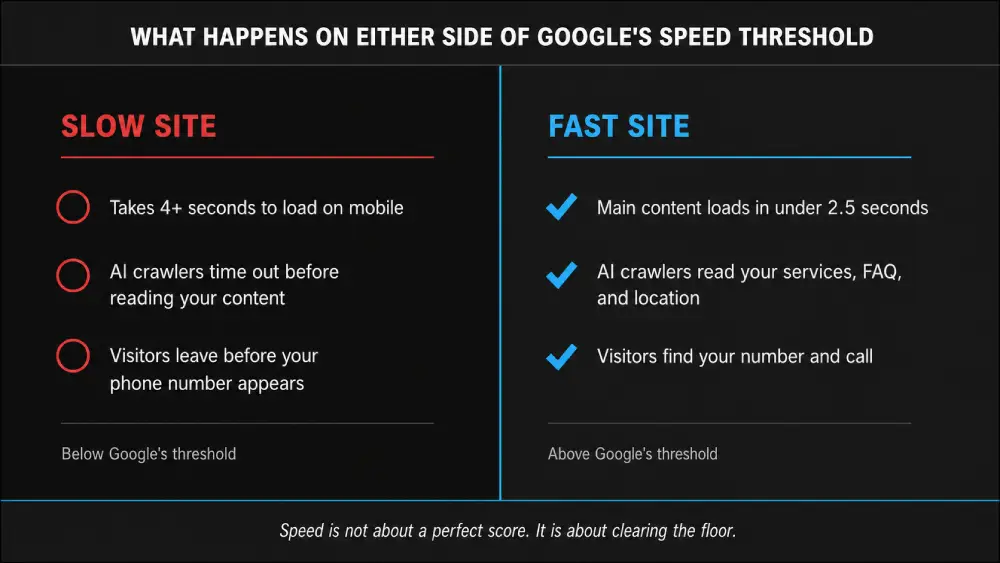
Below Google's speed threshold, AI crawlers abandon your pages and visitors leave before seeing your phone number. Above it, both systems work in your favour.
The PageSpeed score (0–100) is a diagnostic tool. It helps you understand where your problems are and what to fix. What Google actually uses in ranking decisions is your Core Web Vitals data — whether real visitors experienced good LCP, INP, and CLS. That data lives in Google Search Console under the Core Web Vitals report. If you haven't looked at it, that's the right place to start — not the score alone.
What Actually Makes a Service Business Website Load Slowly
Most slow service business websites share the same handful of problems. None of them are hard to understand — they're just not obvious until you know what to look for.
Uncompressed images
A full-resolution photo of a job site is often 3–5 MB. Delivered to a phone on a 4G connection, that's a half-second of load time for a single image. Converting to WebP format and sizing images to fit actual screen dimensions can reduce that by 80–90% with no visible quality loss.
Page builder bloat
Platforms like Elementor and similar drag-and-drop builders load significant CSS and JavaScript whether you use all their features or not. That code runs before your visitor sees any content on the page. The more features baked into the builder, the heavier the starting weight on every single page load.
Cheap shared hosting
On shared servers, your site competes with dozens — sometimes hundreds — of other websites for the same processing resources. When any site on that server sees a traffic spike, yours slows down too. This directly affects Time to First Byte (TTFB), the initial server response time that sets the ceiling on your LCP score.
Render-blocking third-party scripts
Chat widgets, analytics platforms, review embeds, social media buttons, and pop-up tools all load code before your page can show its content. Each one adds delay. A site running eight of these simultaneously is starting every page load with a significant handicap before a single word of your content appears.
No content delivery network (CDN)
A Content Delivery Network serves your site's files from servers close to your visitors. Without one, a homeowner in Barrie or Oakville loading a site hosted on a US-based server adds measurable latency to every request. Cloudflare and similar CDNs have edge nodes in Toronto — which means your pages load noticeably faster for GTA visitors than they would without one.
These aren't problems unique to one type of site. They're the default state of most websites built without performance as a deliberate priority. Fixing them isn't cosmetic. It changes how your site ranks, how AI systems read it, and how many people actually stay long enough to contact you. Speed is a foundation, not an afterthought — which is why it's built into how we approach organic SEO for local businesses from the start.
How to Check Your Website Speed Right Now
The most reliable free tool is Google PageSpeed Insights at pagespeed.web.dev. Enter your site URL and run the test on mobile first — that's the score that matters most for local search rankings.
The Performance score breaks into three zones:
0–49: Poor. Your site has significant performance problems affecting both users and search ranking.
50–89: Needs improvement. You're not facing heavy penalties, but you're not competitive at the top end either.
90–100: Good. You're above Google's floor and competing on equal terms with other fast sites.
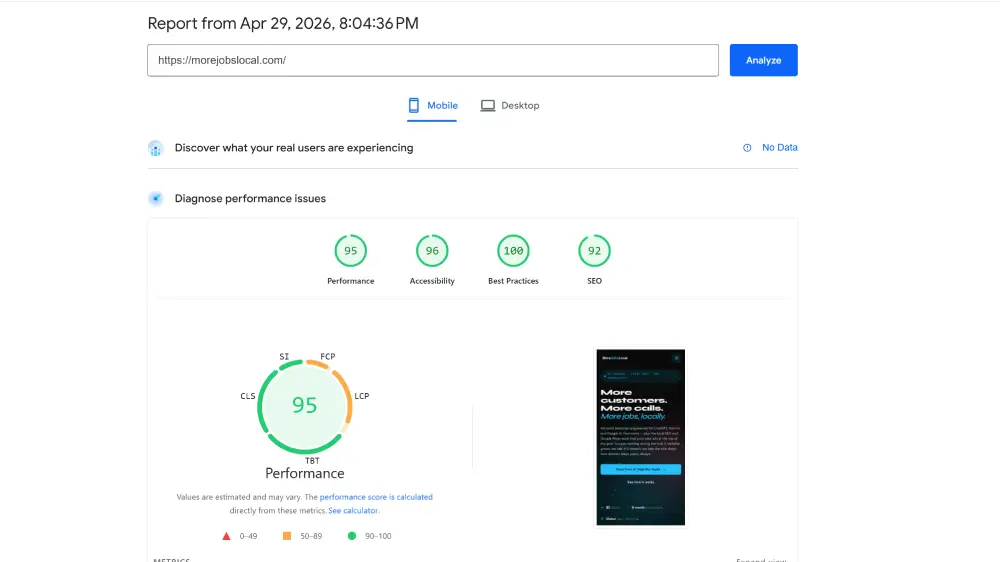
The MoreJobsLocal homepage scored 95 for performance, 96 for accessibility, 100 for best practices, and 92 for SEO on Google PageSpeed Insights — achieved by building on clean HTML without page builder bloat, with compressed WebP images and Cloudflare CDN from day one.
Don't stop at the score. Scroll past it to the Diagnostics section. That's where PageSpeed Insights identifies the specific issues slowing your site, ordered by how much impact each one is having. Large uncompressed images, render-blocking scripts, and slow server response times typically appear near the top for service business websites.
Run both mobile and desktop versions. If there's a significant gap between the two, mobile is the priority to fix first.
Frequently asked questions
Does website speed actually affect my Google ranking?
Yes. Google has confirmed page speed as a direct ranking factor since 2018, and its impact grew with the 2021 Page Experience update, which introduced Core Web Vitals as measurable ranking signals. Speed doesn't outweigh content or backlinks, but sites that fall below Google's performance thresholds face a ranking disadvantage — especially in competitive local markets where multiple businesses are answering the same searches.
How fast should my website load?
Google's Core Web Vitals set the standard. Your Largest Contentful Paint (LCP) — the time until your main content appears — should be under 2.5 seconds. Your page's responsiveness to taps and clicks (INP) should be under 200 milliseconds. And your layout should stay stable during loading, measured by a CLS score under 0.1. These thresholds come from Google's official documentation and are assessed using real visitor data.
What happens if my website is too slow?
A slow website costs you in multiple ways. Visitors leave before they see your contact information. Bounce rates rise, signalling to Google that your page isn't satisfying searchers. Google's algorithm treats consistently poor Core Web Vitals as a ranking signal — your page may appear lower in results than it otherwise would. And AI crawlers like GPTBot may abandon your pages mid-crawl, reducing how often your business appears in AI-generated answers.
Can a slow website stop AI tools from finding my business?
It can. AI systems like ChatGPT, Gemini, and Perplexity use crawlers to read and index web content. Most of these crawlers do not execute JavaScript — they read the raw HTML your server delivers first. If your server responds slowly, crawlers may time out and leave without reading your content. If your key business information loads through JavaScript after the page renders, AI crawlers may never see it. A fast, server-rendered website is the foundation for appearing in AI-generated answers.
Does website speed affect my Google Maps ranking?
Indirectly, yes. Google Maps ranking is primarily driven by your Google Business Profile, reviews, and proximity. But your website is part of the picture — Google uses it to evaluate the credibility and quality of your business online. A slow, poorly-performing website weakens that signal. Mobile speed is particularly important, since most local searches — including the near-me queries that feed Maps results — happen on phones.
Does website speed matter more for GTA and Toronto trades businesses?
The GTA trades market is one of the most competitive local search environments in Canada. Homeowners searching for plumbers, HVAC technicians, roofers, and electricians across Toronto, Mississauga, Vaughan, Markham, and surrounding cities have multiple options in every search. When two businesses have similar reviews and service coverage, Google uses performance signals as a tiebreaker. A slow site in a market this competitive doesn't just rank lower — it loses calls to faster competitors who've done the technical groundwork.
What makes a website load slowly?
The most common causes for service business websites are uncompressed images, page builder platforms that load unused code, cheap shared hosting with slow server response times, third-party scripts that block page rendering, and no content delivery network (CDN). Most slow service business websites have more than one of these issues running simultaneously.
How do I check my website speed?
Go to pagespeed.web.dev and enter your website URL. Run the test on mobile — that's the score most relevant for local search. A Performance score of 90 or above is the target. Below 50 is a significant problem. The Diagnostics section beneath the score shows the specific issues affecting your performance, ordered by impact.
Do I need a perfect score on PageSpeed Insights?
No. The PageSpeed score (0–100) is a diagnostic guide, not a direct ranking signal. What Google actually uses are your Core Web Vitals measurements from real visitors — whether your site delivers good LCP, INP, and CLS for the people actually visiting it. A score of 90 and a score of 100 both clear Google's threshold. Chasing a perfect score is less valuable than making sure your site is consistently fast for real visitors on real devices.
Does website speed affect mobile and desktop the same way?
Google evaluates mobile and desktop performance separately, but mobile is the priority. Google uses mobile-first indexing, which means the mobile version of your site is what Google primarily uses to determine your rankings for all searches — including desktop searches. A site that loads well on desktop but slowly on mobile will still underperform in rankings. Run the mobile version of PageSpeed Insights first.
How does website speed affect whether people contact me?
Significantly. Speed determines whether visitors stay long enough to read your services, find your phone number, or fill out a contact form. Pages that load slowly tend to have higher bounce rates — meaning fewer people ever see your contact information, regardless of how well the page ranks. A fast website doesn't just help you rank. It converts more of the visitors you already have into calls and inquiries.
Get a free speed and visibility check for your GTA business. We'll pull your PageSpeed score, check your Core Web Vitals, and show you exactly where your site stands in Google and AI search — in writing, in about five business days. No credit card. No obligation.